We Built Our Website in 4 Days With AI: Here’s How (with Instructions)
B2B marketing agencies, though often experts, are notorious for incoherent websites. Not without good reason! A good agency stays on their toes, and pivots services as the market demands, but without internal brand alignment, the website can quickly fall out of date.
We fell victim.
Our (lovely) website read like a brochure and its positioning was inaccurate given the evolution of our services. It was time for a change, we decided to make it a challenge: to build a website in four days using AI.
Why to Build a Website with AI
We (The CEO and CMO of StepUp) gave ourselves a max subscription to Claude and a one-week deadline. The CEO lives and breathes the service offer and audience alignment, and the CMO holds the reins on messaging and brand delivery.
The website you’re on is the result.
This isn’t a dev blog post about how satisfying it felt to watch an AI write CSS. You can find plenty of those. This is what happened when a B2B marketing agency — the kind of company that writes GTM strategy for other companies for a living — turned the same rigor inward: the audit, the ICP thinking, the redirect math, the actual before-and-after numbers, and the parts where the AI did something we didn’t expect (in both directions). If you run marketing at a B2B company and you’re wondering whether “rebuild the site in days, not quarters, using AI” is a real option or a LinkedIn flex, we say “yes” – and this is the long answer.
We’ll walk through why the old site had to go, why we picked Claude Code over the four other paths available to us, the hour-by-hour build across four days, where the AI surprised us (and annoyed us), what changed in the 30 days since launch, and — because we’re a marketing agency and not just a group of people who like typing into a terminal (really, we do not) — a reusable framework you can take into your own rebuild, whether or not you touch a line of code yourself.
The Problem: The Old Site Didn’t Clarify Our Positioning
AKA: Practice What You Preach
We’re a bunch of highly qualified former-execs who work as fullstack execution partners delivering boutique services, that wasn’t coming across clearly enough on our site. Nor was the site conveying the ways we’ve integrated AI into our services (think “native” but without the hyperbole).
Our messaging was fine — but we needed some fixes:
- It was slow to change. Updating a page meant filing a request, waiting for a dev window, and hoping nothing broke. For an agency whose entire value proposition is speed of execution, that’s not some minor inconsistency.
- It had no home for our best-performing content. We had blog posts ranking — a total addressable market guide, an ICP explainer, a go-to-market plan breakdown — sitting disconnected from each other with no pillar structure, no internal linking strategy, and no clear path from “I searched define icp” to “I want to talk to this agency.”
- It didn’t reflect where the actual demand was moving. In a keyword-gap review we ran against a competitor — an agency we admire and feel is doing real work in industrial and medtech marketing — we found we already had organic footholds in industrial lead generation and industrial marketing topics. Traffic was showing up. There was no page for it to land on. We were ranking for a business we hadn’t built a front door for.
- It looked like every other B2B agency site. Hero section, three-icon feature grid, logo wall, generic CTA. If you removed our name from the top, you could not tell our site apart from our cohort by scrolling it. That’s fine if you’re selling commodity services. It’s a liability if your entire differentiator is that you’re not doing what everyone else does.
The Numbers
We pulled our own domain data the way we’d pull a prospective client’s,
None of the numbers were catastrophic on their own. We rank on over 290 keywords, we have some solid pillars, we show up. So that’s good news. But there’s e gap between what the numbers showed and our conversions, and so we needed to rethink our content strategy and get more aggressive about AEO and relevance on offer.
The Urgency
The forcing function wasn’t a redesign itch. It was a strategy review where we mapped our own keyword clusters the way we’d map a client’s, and then we laid the clusters against the actual site structure and there wasn’t one. Content existed. Architecture didn’t. A prospective client searching “industrial b2b marketing” who found their way to us would land on a blog post with no next step, no proof we understood their world, and no path into a conversation.
At that point, rebuilding wasn’t a nice-to-have design refresh. It was the fastest way to close the gap between what we tell people in sales calls and what a stranger finds when they Google us at 11pm before a Monday pitch meeting. We gave ourselves four days because that’s roughly how long we’d give a client before we’d call a GTM plan “stale” — if we couldn’t hold ourselves to the same clock, the positioning was hollow.
Why Claude Code (and Why We Kept WordPress)
What we ruled out
We looked at four paths before picking one.
Hire a dev agency for a proper rebuild. This is the default path, and it’s the one every competitor case study we read (chandlernguyen’s blog rebuild, StackOne’s Astro/Cloudflare migration, the dev.to Astro rewrite) implicitly argues against just by existing — they all did it themselves, faster than an agency engagement would move. A typical scoped website rebuild runs 8–12 weeks from kickoff to launch once you account for discovery, design rounds, dev sprints, and QA. We didn’t have a content or budget problem with that path. We had a credibility problem: an agency that sells “we move fast” cannot, in good conscience, take a full quarter to prove it on its own site.
Use an AI website builder (v0, Framer AI, similar tools). These are genuinely good for a from-scratch marketing page. They’re much weaker at working inside an existing, indexed, ranking site where redirect integrity and content preservation matter as much as the new pages you’re adding. We didn’t want a new site. We wanted our site, done right, without losing the 284 keywords we’d already earned.
Rebuild it ourselves manually, the old way. Someone opens the theme files, someone else writes copy in a Google Doc, someone hands off to a developer who’s also doing three other things this week. This is how the old site got the way it was in the first place. Repeating the process just gets you a nicer-looking version of the same problem in another 18 months.
The Option We Chose
Use Claude Code as the primary build tool, with a human — us — directing every decision. This is what we did, and the reason wasn’t novelty. It’s that Claude Code can hold the entire codebase in context, make multi-file changes without losing track of what it changed and why, run and check its own output, and do it at the speed of a conversation instead of the speed of a ticket queue. For a four-day timeline, that’s the only version of “fast” that also holds up to QA.
What “AI-integrated marketing” actually means when it’s not a slide
We use that phrase in pitch decks, so it felt important to actually test it on something with our name on it. AI-integrated, for us, doesn’t mean “we used ChatGPT to write blog outlines.” It means the tool is embedded in the actual production workflow, not bolted onto the front end of it. Claude Code wasn’t drafting website copy for a human to paste in later — it was reading our existing template files, understanding our WordPress theme structure, writing the PHP and CSS itself, running local checks, and flagging what it wasn’t sure about. The best evidence we could offer a prospective client that “AI-integrated marketing” is a real capability and not a buzzword was to point at our own site and say: this is what the workflow produced, in four days, and here’s exactly how.
The Stack We Landed On
Here’s where we differ from every competitor piece we read in researching this: we didn’t move off WordPress. StackOne’s team rebuilt on Astro and Cloudflare. The dev.to case study rebuilt on Astro too. Both are excellent technical write-ups if you’re choosing a stack from zero. We weren’t choosing from zero — we had a marketing team that publishes blog posts and landing pages weekly without needing a deploy, HubSpot forms wired into a CRM that our sales team actually uses, and no appetite to trade “our marketing team can ship a landing page on a Tuesday” for “technically superior, but now every content change is a pull request.”
So the brief we gave Claude Code was narrower and, we think, harder: rebuild the theme layer from the inside. Custom block templates, a real design system, faster page weight, clean schema markup — all inside WordPress, all without breaking the publishing workflow non-technical people on our team rely on every week. If your organization runs on a CMS your marketing team actually uses, this is probably the more honest version of “rebuild the site fast” than ripping the whole platform out and rebuilding on a JS framework, however satisfying that migration is to write up afterward.
The Day-by-Day Build
Day 0: The Brain File
We didn’t start Day 1 by opening a code editor. We started by writing the same kind of narrative document we make every client sit through before we touch their content: a single file capturing our ICP, our positioning against the market, our tone of voice, our non-negotiables, and the page inventory we needed. Internally we call this a brain file — it’s the same practice we use for client onboarding, just pointed at ourselves for the first time.
That file became the system prompt context Claude Code worked from for all four days. It included:
- Our actual ICP: VP Marketing and CMO-level buyers at B2B companies, plus a newly scoped secondary ICP of industrial and medtech manufacturers looking for an AI-capable marketing partner they can actually afford
- Our positioning wedge: full-stack execution, not advisory-only, with AI genuinely embedded in delivery
- Voice rules: direct, no filler, no “in today’s fast-paced digital landscape” openers
- The full list of existing ranking URLs and their current positions, flagged as untouchable without a redirect plan
- The new page inventory we wanted to exist by Day 4
This single-file discipline mattered more than any code change we made. Every time Claude Code proposed a new component or a page structure, it had this file to check itself against, and so did we. Skipping this step is, in our experience, the single biggest reason AI-assisted rebuilds turn into generic-looking sites — the model defaults to a template unless you hand it a real point of view to build from.
Day 1: Audit, Architecture, and the Redirect Map
Morning. We had Claude Code crawl the existing site structure and cross-reference it against our exported organic keyword data — all 284 ranking keywords, with position, URL, and search volume attached. The goal was a single spreadsheet-equivalent (we kept it as a structured markdown table Claude Code could reference in later sessions) mapping every existing URL to its fate: keep as-is, keep with a new template, merge into a pillar page, or redirect.
This is the step every AI-rebuild article we read glossed over or skipped entirely, and it’s the one that actually protects your SEO equity during a fast rebuild. We were not willing to trade our TAM guide’s position-30 ranking on a 33,100-volume keyword for a prettier page. So the rule was explicit: no URL that currently ranks moves or changes without a mapped, tested redirect, and no ranking page’s core content gets rewritten from scratch — it gets refined in place.
By early afternoon we had:
- A full URL inventory (roughly 60 indexed pages)
- A redirect map for the handful of URLs that genuinely needed to consolidate
- A confirmed “do not touch the URL, refine the content” list for the TAM guide, the ICP meaning post, the inbound-vs-content-marketing post, and the go-to-market plan post — our four strongest existing assets
Day 1, Afternoon: Scaffolding the Theme
Afternoon. With the architecture decided, we had Claude Code scaffold the new theme structure inside WordPress: a fresh set of custom block templates, a component library folder, and a local development environment mirroring production so nothing we built touched the live site until Day 4. This is also when we defined the new page types the brain file called for but the old site didn’t have: a proper services architecture reflecting GTM execution (not just “marketing services”), a case study template, and pillar pages for our AI-Integrated Marketing hub.
Day 1 total: roughly 60 pages audited, a redirect map covering every URL change, and a scaffolded theme ready for design work. No design decisions yet — that was intentional. We didn’t want visual polish distracting from the architecture being right first.
Day 2: The Design System and the Pages That Didn’t Exist Yet
Day 2 was almost entirely about building a real design system instead of a page-by-page patchwork, because a design system is what lets you build new page types in hours instead of days for the rest of the project’s life, not just this week.
We gave Claude Code direction on visual tone (the brand color palette, type scale, and a small set of reference screenshots from sites whose density and confidence we liked — not to copy, but to calibrate against) and had it build out:
- A header/footer/navigation system that could flex for both the core site and the new industrial/medtech sub-section without looking bolted on
- A modular CTA block system, because our old site had six different visual treatments for “book a call” and none of them matched
- A pillar-page template built specifically to support long-form content like the TAM guide and the GTM strategy post — with a sticky table of contents, internal cross-linking slots, and FAQ schema built in from the template level, not added post hoc
- A case study template, which we didn’t have at all before this rebuild — a gap that mattered given our positioning is proof-of-execution, not just claims of it
- The Industrial & MedTech AI-Integrated Marketing hub template — distinct enough to speak to a manufacturing buyer’s actual concerns (lead generation, engineers in the buying committee, long sales cycles) without feeling like a separate microsite
Where We Overrode the First Pass
This is the day the human-in-the-loop model mattered most. Claude Code’s first pass at the hero section for the homepage was clean, fast, and completely generic — competent SaaS-template energy, the same three-line headline plus subhead plus button pattern you’d find on five hundred other B2B sites. We rejected it twice and rewrote the direction ourselves: shorter headline, no stock-photo hero image, lead with a specific claim instead of a category statement. The third pass, once we’d given it a sharper brief instead of “make it better,” landed. Design taste is still a place where a human has to hold the line — the AI will happily ship “fine” all day if you let it.
By the end of Day 2 we had a working component library and every template the new architecture needed, still on the local dev environment, still untouched by anything live.
Day 3: Content Migration and the Industrial/MedTech Hub
This was the longest day, and the one where the “AI-integrated marketing” claim either held up or didn’t, because it’s where content and code had to work together instead of in sequence.
Content migration. Every one of the “do not touch the URL” pages from Day 1 got a content refresh — not a rewrite, a refresh. The TAM guide got updated data references, sharper internal links to the new ICP and GTM pillar pages, and FAQ schema pulled from the new template. The ICP meaning post got the same treatment, with added coverage of business ICP meaning and ICP sales meaning subtopics that search intent data showed we were leaving on the table. None of these pages lost their existing URL, and we spot-checked every one against its pre-rebuild cached version to confirm the core ranking content was intact, not diluted.
New Pages and Systems Integration
New pages. This is where the industrial/medtech opportunity became real instead of theoretical. We built out:
- A dedicated Industrial B2B & MedTech AI-Integrated Marketing hub page, directly addressing manufacturers and medtech companies looking for a marketing partner that actually understands AI-integrated execution — not the generic “digital transformation” language most industrial agencies use
- Supporting pages under that hub for industrial lead generation and AI marketing for manufacturers, tying back to content that was already ranking without a home
- A GTM strategy pillar page consolidating our go-to-market content, with clear subsections addressing the key elements of a b2b go-to-market plan — a term we were already ranking for at position 61 with zero supporting architecture around it
Systems integration. Forms across every new page were wired back into HubSpot, matching our existing CRM lead-routing so nothing about the backend sales workflow changed even though every front-end template did. Claude Code handled the form markup and the HubSpot embed configuration directly, which meant no separate ticket to a martech admin to get forms live before launch.
By the end of Day 3, every planned page existed, populated, and internally linked. What remained was making sure none of it broke anything on the way out the door.
Day 4: QA, Launch, and Turning Search Console Back On
Morning: redirect and regression testing. We ran every one of the 284 tracked keywords’ URLs through the redirect map to confirm each resolved correctly — no redirect chains, no accidental 404s, no URL that used to rank now pointing at a generic homepage. This is tedious, and it’s exactly the kind of task Claude Code is good at doing exhaustively without getting bored on keyword 200 the way a human QA pass tends to. It wrote its own test script to walk the full URL list and flag anything that didn’t return the expected status code — we didn’t ask for that, it proposed it once it understood the scope of the check, and it caught two redirect targets we’d mistyped in the Day 1 spreadsheet.
Midday: performance and mobile QA. Page weight, Core Web Vitals, and mobile rendering across the new templates. The pillar-page template’s sticky table of contents broke on smaller viewports in the first pass — a real bug, not a taste issue — and got fixed in about twenty minutes once flagged.
Day 4, Afternoon: Search Console and Go-Live
Afternoon: the Search Console fix. Somewhere in the middle of pre-launch QA, we finally reconnected Google Search Console — a property that had been sitting disconnected for weeks, which meant our own dashboard had a blank space where “actual organic click data” should have been. There’s no elegant way to say this: the fastest way to fix a broken internal reporting gap turned out to be forcing ourselves into a hard launch deadline. We’re not proud of how long it sat broken. We are glad the rebuild made ignoring it impossible.
Evening: go-live. DNS and caching flushed, redirect map pushed live, new pages published, forms tested end to end with real HubSpot submissions, and a rollback snapshot kept on hand in case anything broke that QA hadn’t caught. Nothing did. Site was live by early evening on Day 4.
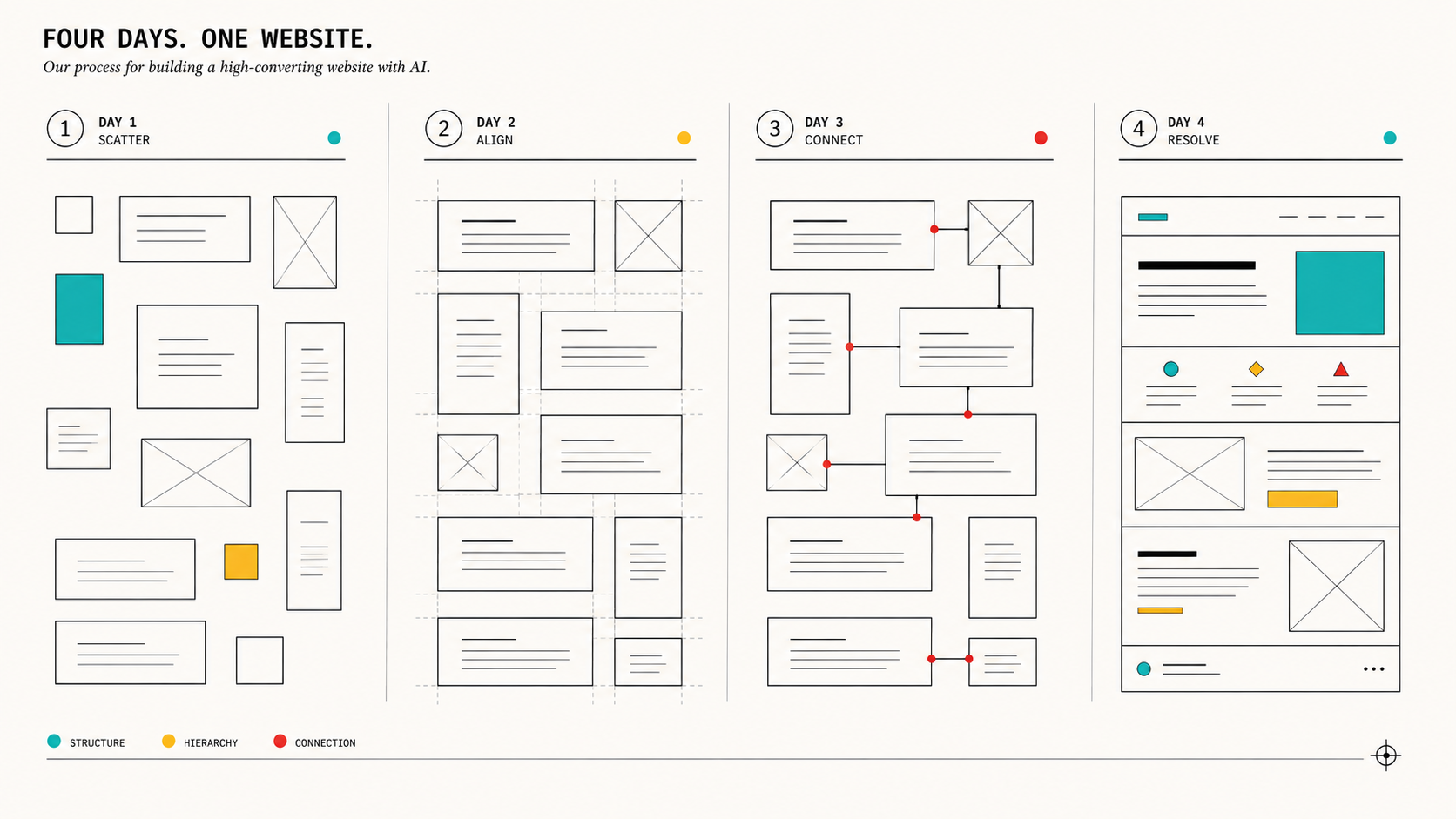
Four days, start to finish: architecture and audit on Day 1, design system and new templates on Day 2, content migration and new page builds on Day 3, QA and launch on Day 4. No day was “easy” — Day 3 ran long, Day 4’s redirect testing was more tedious than anyone expected — but none of it required waiting on anyone outside the room.
Unexpected Moments
Where Claude Code did more than we asked
The redirect test script on Day 4 is the clearest example — we asked for a spot-check, it built an exhaustive one and used it to catch its own earlier mistakes. Two other places it went further than the brief:
- Schema markup we didn’t explicitly request everywhere. Once we asked for FAQ schema on the pillar-page template, Claude Code proposed (and we approved) extending Organization and Article schema consistently across every new page type, not just the ones we’d specified, because it recognized the pattern from the first request and applied it site-wide.
- Orphaned page detection. During the Day 1 audit, it flagged three old blog posts that had no inbound internal links anywhere on the site — pages that existed, indexed, with real search volume, that nothing pointed to. We hadn’t asked it to look for orphans specifically; it surfaced them as part of building the URL inventory because the pattern was visible in the data.
Where we had to pull rank
The generic hero section on Day 2 is one example. Two others stand out:
- Over-engineering the CTA block system. Left alone, Claude Code’s first draft of the reusable CTA component supported about a dozen configurable variants — background style, icon position, button count, layout direction. Technically impressive, practically a maintenance problem for a marketing team that needs to drop a CTA into a blog post without opening a settings panel with twelve options. We cut it down to three variants and it complied immediately once we explained the audience wasn’t a developer.
- A stat that needed fact-checking. In drafting supporting copy for the GTM pillar page, a cited industry statistic didn’t match what we could verify against our own sourced data. We caught it in review, asked for the source, and when it couldn’t produce one that held up, we cut the line rather than keep an unverifiable number on a page with our name on it. This is the same standard we hold client content to, and it’s worth stating plainly: the tool will produce plausible-sounding claims, and a human still has to be the one who decides what’s true enough to publish.
The near-miss
The closest call was on Day 4. One of our highest-value redirects — the old URL for our go-to-market plan content — had been mapped to consolidate into the new GTM pillar page. The redirect worked. What we almost missed was that the old page had picked up a handful of external backlinks over the past year that we hadn’t audited for anchor text context. Had we redirected without checking, those links would have pointed at a page whose framing didn’t quite match the anchor text they’d been built around, which can quietly cost you the SEO value the backlink was providing in the first place. We caught it because the redirect test script’s output included the destination URL next to each source, and something about the pairing looked off on a second read. We adjusted the pillar page’s opening section to better match the context those backlinks expected before finalizing the launch. Small fix, but it’s the kind of thing that only surfaces if a human is actually reading the QA output instead of just checking for a green checkmark.
The Numbers: What Changed
Before / after
The comparison that matters most to us in a transfer is the redirect integrity number. Zero of our 284 ranking keywords lost their page or dropped into a redirect chain during the fastest rebuild we’ve ever run. That’s the number that tells you whether “fast” and “reckless” are the same thing here. They weren’t.
30 days post-launch
- No ranking drop on the four protected pillar pages (TAM guide, ICP meaning, inbound vs. content marketing, GTM plan) — all four held their pre-launch positions within normal week-to-week variance, confirming the “refine, don’t rewrite” rule did its job.
- New Industrial & MedTech hub page indexed within days and began pulling early impressions on industrial lead generation and ai marketing for manufacturers terms — too early to call a ranking win, but the page now exists to catch the traffic that was previously landing on orphaned blog content with no next step.
- Time-to-publish for a new landing page dropped from “plan and wait” to same-day, which is the operational change that actually matters long after this rebuild is old news — our marketing team can now ship a new page type without a developer in the loop, because the design system Claude Code built is something our own content team can extend inside WordPress using the existing block templates.
- Case study template usage: three client case studies published in the 30 days since launch, versus zero in the prior quarter, simply because a template now exists and publishing one doesn’t require custom design work each time.
We’re not going to pretend a 4-day rebuild produced a hockey-stick traffic chart in 30 days — that’s not how organic works, and anyone claiming otherwise in a case study like this is selling you something (which is fine, but, you know). What changed measurably and immediately is publishing velocity, SEO equity retention, and having an actual front door for a market we were already earning traffic from.
The 4-Day Framework You Can Steal
If you’re a marketing leader weighing whether this is a real option for your own site — here’s the framework, mapped explicitly to GTM discipline rather than dev-team logistics, because that’s the lens that determines whether it works.
Day 1 — Lock the narrative before you touch a template.
- Write the brain file first: ICP, positioning wedge, voice rules, non-negotiables. If you can’t write this in a page, you’re not ready to rebuild — you’re ready to workshop. (We run this workshop)
- Audit every existing ranking URL and its position/volume. Nothing gets touched without a documented reason.
- Build the redirect map before the design system exists. Architecture decisions should follow the narrative and the SEO equity you’re protecting, not the other way around.
Day 2 — Design system reflects the narrative, not a template library.
- Build components, not pages — CTA blocks, headers, pillar templates, case study templates, whatever your new architecture calls for.
- Expect the AI’s first pass to default to generic. Reject it explicitly and give sharper direction rather than vague “make it better” feedback.
- Resist over-engineering. If a non-technical person on your team can’t use the component without a settings manual, simplify it before it ships.
Framework Days 3 and 4
Day 3 — Migrate protectively, build expansively.
- Refresh, don’t rewrite, anything that currently ranks. Preserve the URL, sharpen the content, add internal links to new pages.
- Build the new pages your keyword and ICP data says you’re missing — the gap between what you rank for and what you have a page for is usually sitting in your own analytics already.
- Wire systems (CRM, forms, tracking) as you build, not as a separate step afterward.
Day 4 — Launch is a GTM event, not a deploy.
- Test redirects exhaustively — every tracked keyword’s URL, not a sample.
- QA against business goals, not just visual bugs: does every page have a next step, does every form route correctly, is analytics actually connected before go-live (not after).
- Keep a rollback plan on hand and use the launch deadline to fix the internal reporting gaps you’ve been ignoring — you’ll finally have a reason to.
Steal this framework directly. The specific tool matters less than the discipline: narrative before architecture, protection before expansion, and treating launch day as a business event with a checklist, not a code deploy with a party.
Should You Do This Yourself? Answering the Objections
“Isn’t this risky without a development team?” We had development judgment in the room the entire time — ours. Claude Code didn’t replace the need for someone who understands code, redirects, and SEO risk. It replaced the waiting: the ticket queue, the sprint planning, the calendar coordination across a dev agency’s other clients. If you don’t have anyone on your team who can read a redirect map and catch a broken template, that gap doesn’t disappear because the tool is capable — you still need a human who can tell good output from confident-sounding bad output.
“What about code quality and long-term maintainability?” This is a fair concern with any fast build, AI-assisted or not. Our answer was structural: we built inside WordPress specifically so our non-technical marketing team can maintain and extend the site without touching the underlying template code, and we kept the component system deliberately simple (three CTA variants, not twelve) so future changes don’t require re-learning a complex system. Speed at launch doesn’t help you if the thing you shipped can only be touched by the same tool that built it.
Rankings and the Four-Day Clock
“Won’t you lose search rankings moving that fast?” Only if you skip the audit step to save time, which is the one place we refused to move fast. The redirect map and protected-URL list took longer than any other single task on Day 1, and it’s the reason we launched with zero ranking pages lost. Speed on execution and rigor on protection aren’t in tension — the rigor is what makes the speed safe.
“Isn’t four days just a marketing claim?” It’s a real clock, but it’s a clock that only closes because the narrative work — the brain file, the ICP clarity, the positioning decisions — happened before Day 1 started, not during it. If you walk into this without your GTM story already sharp, you’ll spend your four days figuring out who you are instead of building the site that says it. The build was fast because the thinking wasn’t rushed.
What This Means If You Run B2B Marketing
The honest takeaway isn’t “AI can build your website in four days,” even though that’s technically what happened here. It’s that the constraint most B2B marketing teams treat as fixed — website changes are slow, expensive, and gated by a dev team’s calendar — isn’t actually fixed anymore, if you’re willing to put the same GTM discipline into your own site that you’d put into a client’s. AI-integrated marketing, done properly, isn’t a content-generation shortcut. It’s a way to close the gap between what your positioning claims and what a stranger finds when they search for you, on a timeline that matches how fast your market actually moves.
We rebuilt our site in four days because our own positioning demanded we prove speed was real, not aspirational. If you’re weighing whether your site says the same thing your sales team says on a call — and whether you could close that gap in days instead of a quarter — that’s a conversation we’re set up to have, because we just had it about ourselves first.
Want to know where your marketing stands against the market? The AI-Readiness Audit is a short call that looks at your marketing and pinpoints exactly where the gap is — and what it is worth to close first. You leave with a clear picture, even if we never work together.