AI in B2B Marketing: An Operator’s Playbook for 2026

AI in B2B marketing uses machine learning and predictive models to do three jobs marketers once did by hand. It analyzes account and buyer signals, generates content variations, and decides who to target and when. Everything else is a variation on those three verbs.

Most articles about AI in B2B marketing read like a vendor’s product tour with a few stats bolted on. They tell you AI can “personalize at scale” and “surface intent signals,” then push you toward a platform demo. What they don’t tell you is how AI earns its place inside a working go-to-market motion. It has to sit somewhere specific: your ICP definition, your content pipeline, your ABM plays, your TAM math. You also need a way to keep the output from sounding like every other AI-generated blog post on the internet.

This is that guide. We’re a GTM execution agency, not an AI vendor. We have no platform to sell you, so we can tell you the truth about what works and what doesn’t. That includes where the “loss of human connection” problem everyone name-checks actually comes from. Hint: it isn’t the AI’s fault.

What This Guide Covers

By the end of this piece you’ll have:

  • A clear, jargon-free definition of what AI in B2B marketing actually means in 2026
  • A function-by-function breakdown of where AI is genuinely earning its keep (and where it’s theater)
  • A vendor-neutral map of the tool landscape, organized by GTM function instead of by which company paid for the “best of” listicle
  • A real, anonymized client example showing AI embedded at three different GTM stages with actual before/after numbers
  • A concrete method for fixing “AI content sounds robotic” — not just a warning that it can
  • An AI-Integrated GTM Maturity Model you can use to self-assess where you are today
  • A step-by-step implementation framework tied back to ICP, TAM, and GTM strategy — not a standalone AI initiative floating apart from the rest of your marketing

What Is AI in B2B Marketing?

AI in B2B marketing covers three jobs a marketing team used to do entirely by hand. Analyze signals about accounts and buyers. Generate content and creative variations. Decide, in real time, who to target and what to say to them.

That’s it. Strip away the hype and AI in B2B marketing collapses into those three verbs: analyze, generate, decide.

One distinction matters more than the rest, and almost every other article glosses over it. It’s the difference between AI as a bolt-on tool and AI as an integrated layer of your GTM system. A bolt-on tool means someone on your team uses ChatGPT to draft blog outlines. An integrated layer means your ICP data, intent signals, content engine, ABM sequencing, and lead scoring all feed each other through AI. That happens continuously, with nobody re-keying data between five different tabs.

Most companies are doing the first. The ones winning right now are doing the second. That gap — not access to the technology itself, since everyone has access to the same handful of tools — is what separates AI-integrated marketing from AI-decorated marketing.

We use the term AI-integrated marketing deliberately instead of “AI marketing” for this reason. AI marketing implies AI is the strategy. AI-integrated marketing means AI is embedded inside a strategy that already exists — your GTM strategy, built around a real ICP and a real TAM. That strategy then executes faster and targets more sharply than a human-only team could manage.

How AI Is Used Across B2B Marketing Functions

AI’s usefulness varies enormously by function. Some of this is genuinely transformative. Some of it is still better done by a person. Here’s the honest breakdown, function by function.

AI in Content Marketing and Creation

This is where AI gets the most attention and, frankly, causes the most damage when misused. AI can draft outlines, generate first-pass copy, repurpose long-form content into social posts and email snippets, and summarize research at a speed no writer can match.

What it can’t do on its own is sound like you. Generic prompting into a generic model produces generic output — which is exactly why AI Overviews and search results are now saturated with interchangeable, forgettable B2B content. We’ll cover the actual fix for this in the “loss of human connection” section below, because it’s solvable, and almost nobody explains how.

Where AI genuinely earns its place in content workflows:

  • Research synthesis. AI pulls themes out of interview transcripts, call recordings, and review comments faster than a human could read them.
  • Draft velocity — turning a structured brief into a first draft in minutes instead of hours, freeing a writer’s time for the editing pass that actually matters
  • Repurposing — turning one pillar asset into a dozen distribution formats without a dozen separate writing projects
  • SEO structural work — mapping search intent, clustering keywords, and identifying content gaps against competitors at a scale manual research can’t match

AI in Account-Based Marketing (ABM)

AI has changed ABM more than almost any other function. ABM has always been a data-matching problem at its core: which accounts look like our best customers, and what signals tell us they’re in-market right now.

Predictive account scoring models now ingest firmographic data, technographic data, intent data, and engagement history. They rank accounts by propensity to buy, updated continuously rather than quarterly. AI-driven ABM platforms can also auto-generate account-specific messaging variants. They identify the “buying committee” too — the cluster of individuals at a target account genuinely influencing the decision — well before a sales rep would spot them manually.

AI in Lead Scoring and Predictive Analytics

Traditional lead scoring was a static point system: download a whitepaper, get 10 points; visit pricing page, get 20 points. It was crude and it aged badly. AI-based predictive lead scoring instead trains on your actual closed-won and closed-lost history to find the real patterns — which often aren’t the ones marketers assume. We’ve seen models surface an unexpected combination: job title plus company size plus a single content download. It predicted conversion far better than the “high engagement” leads everyone assumed were hottest.

This matters enormously for TAM and ICP work: predictive scoring is only as good as the ICP definition feeding it. Garbage ICP in, garbage lead scoring out — which is why this function can’t be separated from your foundational GTM strategy work (more on this in the implementation section).

AI in Personalization at Scale

AI enables 1:1 personalization across web experiences, email sequences, and ad creative. It works at a granularity no human team could manage by hand. Landing pages shift headline and proof points based on the visitor’s industry. Email send times optimize per recipient. Ad creative rotates toward whichever variant a specific account segment responds to.

The risk here is the uncanny valley of personalization: name-merge-field emails that technically say “Hi {FirstName}” but clearly weren’t written with any real understanding of that account’s situation. Real personalization requires the underlying data (ICP segments, account research, buying stage) to actually be good — AI amplifies whatever strategy is underneath it, for better or worse.

AI in Email Marketing and Nurture

AI now handles subject line testing, send-time optimization, dynamic content blocks based on lifecycle stage, and predictive churn/re-engagement flags for dormant leads. This is one of the lowest-risk, highest-ROI applications of AI in the entire B2B stack. Email is a closed, measurable channel, so you can A/B test and iterate with real data almost immediately.

AI in SEO and Search

AI tools now handle keyword clustering, content gap analysis, and structured data generation. Increasingly they also optimize directly for AI Overviews and answer engines rather than traditional blue-link SERPs. This last point deserves attention. More B2B research now happens inside AI chat interfaces than on search results pages. Being cited as a source inside an AI-generated answer has become its own optimization target, separate from ranking position. We built the FAQ section of this very article with that in mind.

The Benefits of AI-Integrated B2B Marketing

AI adoption in B2B marketing has moved fast, from early-adopter experimentation to default practice in a couple of years. Marketers using it consistently report gains in content output volume and campaign turnaround time. Efficiency, not creativity, remains the number one reported benefit — teams are producing more variants, more segments, and more campaigns in the same headcount, not necessarily better strategy.

That’s an important distinction: the data consistently shows AI amplifies execution speed. It does not, on its own, improve strategic clarity. Every survey report on this topic buries that nuance under the headline efficiency number. That’s exactly why the “AI in B2B marketing” conversation keeps producing thin, stat-heavy articles with no execution framework behind them. Speed without direction just gets you to the wrong place faster.

The real, durable benefits we see across GTM-integrated deployments:

  • Faster time from research to launch. The ICP-to-content-to-campaign cycle drops from 4-6 weeks to 1-2 when AI handles synthesis and first drafts.
  • Better signal-to-noise in targeting — predictive scoring surfaces accounts sales would have deprioritized manually
  • Content volume without proportional headcount growth — a lean team can now sustain a publishing cadence that used to require double the writers
  • Faster feedback loops — AI-assisted analytics shorten the time between “we tried this” and “here’s what happened,” letting teams iterate weekly instead of quarterly

Limitations and Challenges

Every top-ranking article on this topic lists these limitations as a paragraph of caveats. None of them tell you how to actually solve them. Here’s the honest version.

Data Quality Is the Real Bottleneck

AI models are only as good as the data they’re trained and run on. Say your CRM has duplicate records, inconsistent firmographic tagging, and a lead source picklist nobody’s cleaned up in two years. Your predictive scoring model will confidently produce garbage. Because it’s a model rather than a spreadsheet formula, that garbage will look authoritative. We’ve walked into engagements where the single highest-leverage AI project wasn’t a new tool at all — it was a CRM data hygiene sprint that had to happen first.

The fix: before any predictive AI investment, audit your source-of-truth data — lead source attribution, firmographic completeness, deduplication — and lock down your data model. This is unglamorous and it’s also the actual prerequisite everyone skips.

Over-Reliance and the Erosion of Judgment

The failure mode isn’t “AI made a bad decision.” It’s “the team stopped checking AI’s decisions.” Lead scores, content recommendations, and audience segments all flow through automated models. A team can lose the muscle of asking the obvious question: does this actually make sense for our ICP? AI should compress the time to a decision. The judgment about whether the output is right stays with a person.

The fix: build a standing review cadence — even fifteen minutes weekly — where a human GTM owner spot-checks AI-driven scoring and targeting decisions against real deal outcomes. Treat AI outputs as a strong first draft of a decision, not the decision itself.

Loss of Human Connection — And How to Actually Fix It

This is the limitation every single competing article names and none of them solve. “AI content can feel generic” is treated as an inherent, unfixable property of AI. It isn’t. It’s a symptom of a specific, correctable input problem: generic prompts produce generic output because most teams never give the model anything specific to say.

Here’s the method that actually works, and it’s the one we use with every client:

The Three-Step Fix for Generic AI Content

  1. Build a narrative foundation before you generate anything. Before AI ever writes a word, we compile a structured knowledge base. It holds customer language pulled directly from sales calls and reviews, the client’s positioning and point of view, the real objections prospects raise, and the proof points that differentiate them. We call this a brain file. Without it, an AI model defaults to the statistical average of everything ever written about your topic — which is precisely why so much AI content sounds the same. With it, the model has something specific to draw from instead of generic industry-speak.
  2. Generate from that foundation, not from a bare prompt. “Write a blog post about AI in B2B marketing” produces filler. “Write from this positioning, using this customer language, making this specific argument, with this proof point” produces something that sounds like a person who knows the subject.
  3. Always close with a human edit pass focused on specificity, not grammar. The edit that matters isn’t fixing typos — it’s stripping out every sentence a competitor could publish word-for-word and replacing it with something only your company could credibly say.

Skip step 1 and no amount of prompting cleverness in step 2 will fix it. This is the actual answer to “why does AI content feel robotic” — and it’s the reason a genuinely narrative-first, GTM-integrated process outperforms a bare AI writing tool every time.

AI Marketing Tools and Platforms (Vendor-Neutral)

Every other article ranking for this term is written by a vendor pushing their own platform through the “best tools” section. We don’t sell software, so here’s the landscape organized by the GTM function it actually serves — not by whose blog you’re reading.

The Tool Landscape by GTM Function

GTM Function What These Tools Do Key Selection Criterion Red Flag
Content Generation & Optimization LLM interfaces, AI writing assistants, and SEO content platforms. They draft, repurpose, and structure content. Can it ingest your own brand and customer data as context? Or does it only generate from generic training data? Output needs a full rewrite, not a light edit. You added a step instead of saving one.
ABM & Predictive Account Intelligence Platforms that combine intent, technographic, and firmographic data into account scoring models. How many data sources it draws on. Also how cleanly the scores flow back into your CRM and ad platforms. You need a manual list export to act on the scores. The “integration” is a spreadsheet.
Lead Scoring & CRM-Native Predictive Tools Predictive scoring built into — or bolted onto — the CRM you already run. What your existing CRM already does natively, before you buy anything standalone. Paying for a point solution that delivers the same 80% your CRM already gives you on clean data.
Personalization & Dynamic Content Tools that change web pages, email content, and ad creative based on who is looking at them. Speed, so personalization does not slow the page down. And whether the segments are genuinely granular. “1:1 personalization” that turns out to be a handful of broad segments.
SEO & Answer-Engine Optimization Keyword clustering, content gap analysis, structured data, and AI Overview visibility tracking. Whether it tracks answer-engine citations, not just blue-link rank. Ask the vendor about their AI Overview roadmap. No answer is the answer.

The Real Selection Criteria

Across every category, the questions that matter more than any feature checklist:

  • Does it integrate with the CRM and data you already have? Or does it need a parallel data model?
  • Can it ingest your own brand/customer context, or only generate from generic training data?
  • Does the output require a full human rewrite, or a light edit? (If it’s the former, you haven’t saved time — you’ve added a step.)
  • Is there a clear owner on your team who will actually maintain it, or will it join the pile of unused logins six months from now?

Buy for the workflow gap you have today, not the roadmap a sales rep shows you in a demo.

Trends and the Future of AI in B2B Marketing

A few shifts are worth planning around now rather than reacting to later:

Answer-engine visibility is becoming its own optimization discipline, separate from traditional SEO. Being the cited source inside an AI-generated answer requires structured, specific, well-sourced content. That holds in ChatGPT, Perplexity, and Google’s AI Overviews alike. Thin, generic filler never gets there. Ironically, the flood of generic AI content is making specific, well-researched content more valuable. It’s what the answer engines have to reach for when everything else is indistinguishable across ten competing sites.

Predictive and prescriptive analytics are converging with execution. Today’s tools mostly tell you which accounts are hot. The next generation increasingly suggests — or auto-executes — the next best action: which sequence to trigger, which ad variant to serve, which rep to route a lead to. The GTM teams that win this transition will be the ones with clean enough data and clear enough playbooks that automated execution is trustworthy rather than reckless.

AI-integrated marketing is becoming a baseline expectation, not a differentiator. The differentiator is shifting. It used to be “do you use AI,” and soon everyone will. The real question becomes whether your AI usage is embedded in a GTM strategy or bolted onto disconnected point tools. That’s the gap this guide has been describing, and it’s only going to widen.

Human specificity becomes the scarce resource. AI-generated content is saturating every category. That makes specific insight the scarce thing: real customer language, real proof points, a real point of view. It’s hard to fake and therefore valuable. Teams that treat AI as a speed multiplier on top of real strategic work will pull further ahead of teams using it as a replacement for strategic work.

A Real Example: AI Embedded Across GTM Stages

Here’s what AI-integrated marketing looks like in practice, from an engagement with one of our clients — a mid-sized industrial equipment manufacturer selling to plant operations and engineering buyers. We’re not naming the client, per our standard confidentiality practice, but the numbers and workflow are accurately represented.

Stage 1: ICP and TAM Refinement

The team came to us with a TAM estimate built on a broad industry code list and no real segmentation of which sub-segments actually converted. We ran AI-assisted analysis of their closed-won deal data, cross-referencing firmographic data, technographic signals, and deal size. One combination stood out. Plant size paired with equipment age converted at nearly 3x the rate of the “average” target account the team had been chasing. That single refinement cut their addressable list by roughly 40% while increasing average deal size in the remaining segment.

Stage 2: Content and Demand Generation

Using the narrative-first method described earlier, we built a brain file from sales call transcripts and customer interviews. It captured the actual language engineering buyers used to describe their problems, which differed sharply from the marketing department’s internal language. Content generated from that foundation was briefed and edited by a human strategist, then drafted with AI assistance. Production time fell by roughly 55%. Organic traffic to the new content cluster grew month over month, because the content used language buyers actually searched for.

Stage 3: ABM and Lead Scoring

With the refined ICP from Stage 1 feeding a predictive scoring model, sales development reps stopped working a flat, unranked list of several hundred accounts. They worked a ranked list instead. Top-quintile accounts converted to opportunity at more than double the rate of the unranked baseline. Reps reported meaningfully shorter time spent per qualified opportunity because they were prioritizing the right accounts instead of working the list top to bottom.

The throughline across all three stages: AI wasn’t a separate initiative. It was embedded inside GTM strategy work that already had a clear ICP and TAM foundation. Remove that foundation and the same AI tools would have simply executed the wrong strategy faster.

AI-Integrated GTM Maturity Model: Where Are You Right Now?

Use this to self-assess before investing further in any AI tool. Most teams overestimate their stage.

Stage What It Looks Like Diagnostic Question
Stage 0
Ad Hoc
People use general AI tools informally. Someone drafts emails in ChatGPT. No shared process, no brand context, no measurement. Is there any shared process at all, or is it whoever remembers to try it?
Stage 1
Point Tools
One or two dedicated AI tools are in place. They run in isolation from each other and from any documented ICP or GTM strategy. Do the tools talk to each other, or does someone re-key data between them?
Stage 2
Embedded Workflows
AI tools connect to clean CRM data and a documented ICP. Content draws on a real narrative foundation. Someone owns the stack and reviews output on a regular cadence. Can you point to a specific ICP document your AI scoring model is built from?
Stage 3
Compounding System
AI sits across the full GTM motion — TAM and ICP, content, ABM, scoring, nurture. Each stage feeds the next. Does better ICP data measurably produce better scoring, and better scoring better-targeted content?

Most B2B marketing teams sit at Stage 1 — they assume adopting a tool means they’ve reached Stage 2 without ever connecting it to real ICP data. If you can’t point to that document, you’re at Stage 1, regardless of how many AI tools are in your stack.

How to Implement AI in Your Marketing Strategy: Step by Step

This is the framework every other article skips in favor of generic “start small, measure often” advice. Here’s the actual sequence, tied back to GTM fundamentals instead of floating as a standalone AI initiative.

Step 1: Fix Your ICP and TAM Foundation First

Before touching any AI tool, get honest about who your best customers actually are — not who you wish they were. Pull your closed-won data, identify the real patterns in firmographics, deal size, and sales cycle length, and use that to sharpen your ICP definition and TAM estimate. Every AI tool downstream — scoring, targeting, content — inherits the quality of this step. Skipping it is the single most common reason AI initiatives underdeliver.

Step 2: Audit and Clean Your Core Data

Check lead source attribution, deduplicate CRM records, and standardize firmographic tagging. This is unglamorous work and it’s the actual prerequisite for any predictive model to produce trustworthy output. Budget real time for this. It’s frequently the highest-leverage week of the entire project.

Step 3: Build Your Narrative Foundation

Compile the knowledge base AI will draw from — real customer language from sales calls and reviews, your actual positioning, your proof points, your competitive differentiation. This is what separates AI-integrated content from generic AI-generated filler, and it’s a one-time investment that pays off across every piece of content you produce afterward.

Step 4: Pick One Function to Integrate First

Don’t try to embed AI across content, ABM, scoring, and email simultaneously. Pick the function where clean data already exists and the strategic foundation is already built. That’s usually content or lead scoring. Get that one workflow fully embedded before expanding.

Step 5: Assign a Human Owner and a Review Cadence

Every AI-integrated workflow needs a named owner who reviews output against real outcomes on a fixed schedule. Content and email deserve a weekly review; ABM scoring can run monthly. This is the guardrail against the over-reliance failure mode covered above.

Step 6: Measure Against Pipeline, Not Just Output Volume

The easy trap is measuring AI success by content volume or email sends — vanity metrics that go up regardless of strategic quality. Measure against the metrics that actually matter. Compare opportunity conversion rates for AI-scored accounts against unscored ones. Track organic traffic growth from content built on a real narrative foundation, and sales cycle length for AI-prioritized accounts.

Step 7: Expand One Function at a Time, Compounding as You Go

Once one workflow is genuinely embedded, connected to clean data and a real strategic foundation, expand to the next function. Feed its output back into the ones already running. This is how you move from Stage 1 to Stage 3 on the maturity model above: one deliberate, measured expansion at a time, not a simultaneous tool-buying spree.

FAQs

What does AI in B2B marketing actually mean?

It means using machine learning and generative AI to analyze account and buyer data, generate content and campaign variations, and make real-time targeting decisions. The best results come when it sits inside an existing GTM strategy rather than running as a standalone initiative.

Is AI replacing B2B marketers?

No. Adoption data consistently shows AI improving execution speed and content volume, not replacing strategic decision-making. Teams that treat AI outputs as decisions to be reviewed, not decisions already made, get the best results.

What’s the difference between AI marketing and AI-integrated marketing?

AI marketing often means point tools used in isolation — a writing assistant here, a scoring tool there. AI-integrated marketing means those tools draw from the same ICP data and narrative foundation and feed each other, compounding in effectiveness rather than operating as disconnected experiments.

Why does AI-generated content sound generic?

Because most teams prompt AI models with no specific brand or customer context, so the output defaults to the statistical average of everything else written on the topic. The fix is building a structured narrative foundation — real customer language, positioning, and proof points — before generating anything, then editing for specificity, not just grammar.

What should I fix before investing in AI marketing tools?

Your ICP definition, your CRM data quality, and your core narrative/positioning. AI tools amplify whatever foundation is underneath them — a weak ICP or messy data produces confidently wrong output at scale, which is worse than no automation at all.

Which AI tools should a B2B marketing team start with?

Start with the function where your data is already clean and your foundation is built. That’s usually content generation or lead scoring. Avoid buying tools across every function at once. Evaluate any tool on whether it can ingest your own brand and customer context, not just its feature list.

How do I measure whether AI is actually working in my marketing?

Track pipeline-level outcomes. Compare opportunity conversion rates for AI-scored versus unscored accounts, and watch AI Overview citations for narrative-founded content. Sales cycle length for AI-prioritized targets tells you more than content volume or emails sent.

Will AI content ranking hurt my SEO?

Generic AI content is increasingly indistinguishable from every other site’s generic AI content, which makes genuinely specific, well-sourced content more valuable, not less. Content built on a real narrative foundation performs well in traditional search and in AI Overview citations. Content generated from bare prompts blends into the noise.


AI in B2B marketing isn’t a separate strategy from your GTM plan — it’s an execution layer on top of one. The teams pulling ahead right now aren’t the ones with the most AI tools. They’re the ones who fixed their ICP and TAM foundation first, built a real narrative to feed the models, and embedded AI inside a GTM system that was already sound. Everything else is just faster execution of whatever strategy — good or bad — was already underneath it.
We Built Our Website in 4 Days With AI: Here’s How (with Instructions)

B2B marketing agencies, though often experts, are notorious for incoherent websites. Not without good reason! A good agency stays on their toes, and pivots services as the market demands, but without internal brand alignment, the website can quickly fall out of date.

We fell victim.

Our (lovely) website read like a brochure and its positioning was inaccurate given the evolution of our services. It was time for a change, we decided to make it a challenge: to build a website in four days using AI.

Why to Build a Website with AI

We (The CEO and CMO of StepUp) gave ourselves a max subscription to Claude and a one-week deadline. The CEO lives and breathes the service offer and audience alignment, and the CMO holds the reins on messaging and brand delivery.

The website you’re on is the result.

This isn’t a dev blog post about how satisfying it felt to watch an AI write CSS. You can find plenty of those. This is what happened when a B2B marketing agency — the kind of company that writes GTM strategy for other companies for a living — turned the same rigor inward: the audit, the ICP thinking, the redirect math, the actual before-and-after numbers, and the parts where the AI did something we didn’t expect (in both directions). If you run marketing at a B2B company and you’re wondering whether “rebuild the site in days, not quarters, using AI” is a real option or a LinkedIn flex, we say “yes” – and this is the long answer.

We’ll walk through why the old site had to go, why we picked Claude Code over the four other paths available to us, the hour-by-hour build across four days, where the AI surprised us (and annoyed us), what changed in the 30 days since launch, and — because we’re a marketing agency and not just a group of people who like typing into a terminal (really, we do not) — a reusable framework you can take into your own rebuild, whether or not you touch a line of code yourself.

The Problem: The Old Site Didn’t Clarify Our Positioning

AKA: Practice What You Preach

We’re a bunch of highly qualified former-execs who work as fullstack execution partners delivering boutique services, that wasn’t coming across clearly enough on our site. Nor was the site conveying the ways we’ve integrated AI into our services (think “native” but without the hyperbole).

Our messaging was fine — but we needed some fixes:

  • It was slow to change. Updating a page meant filing a request, waiting for a dev window, and hoping nothing broke. For an agency whose entire value proposition is speed of execution, that’s not some minor inconsistency.
  • It didn’t reflect where the actual demand was moving. In a keyword-gap review we ran against a competitor — an agency we admire and feel is doing real work in industrial and medtech marketing — we found we already had organic footholds in industrial lead generation and industrial marketing topics. Traffic was showing up. There was no page for it to land on. We were ranking for a business we hadn’t built a front door for.
  • It looked like every other B2B agency site. Hero section, three-icon feature grid, logo wall, generic CTA. If you removed our name from the top, you could not tell our site apart from our cohort by scrolling it. That’s fine if you’re selling commodity services. It’s a liability if your entire differentiator is that you’re not doing what everyone else does.

The Numbers

We pulled our own domain data the way we’d pull a prospective client’s,

None of the numbers were catastrophic on their own. We rank on over 290 keywords, we have some solid pillars, we show up. So that’s good news. But there’s e gap between what the numbers showed and our conversions, and so we needed to rethink our content strategy and get more aggressive about AEO and relevance on offer.

The Urgency

The forcing function wasn’t a redesign itch. It was a strategy review where we mapped our own keyword clusters the way we’d map a client’s, and then we laid the clusters against the actual site structure and there wasn’t one. Content existed. Architecture didn’t. A prospective client searching “industrial b2b marketing” who found their way to us would land on a blog post with no next step, no proof we understood their world, and no path into a conversation.

At that point, rebuilding wasn’t a nice-to-have design refresh. It was the fastest way to close the gap between what we tell people in sales calls and what a stranger finds when they Google us at 11pm before a Monday pitch meeting. We gave ourselves four days because that’s roughly how long we’d give a client before we’d call a GTM plan “stale” — if we couldn’t hold ourselves to the same clock, the positioning was hollow.

Why Claude Code (and Why We Kept WordPress)

What we ruled out

We looked at four paths before picking one.

Hire a dev agency for a proper rebuild. This is the default path, and it’s the one every competitor case study we read (chandlernguyen’s blog rebuild, StackOne’s Astro/Cloudflare migration, the dev.to Astro rewrite) implicitly argues against just by existing — they all did it themselves, faster than an agency engagement would move. A typical scoped website rebuild runs 8–12 weeks from kickoff to launch once you account for discovery, design rounds, dev sprints, and QA. We didn’t have a content or budget problem with that path. We had a credibility problem: an agency that sells “we move fast” cannot, in good conscience, take a full quarter to prove it on its own site.

Use an AI website builder (v0, Framer AI, similar tools). These are genuinely good for a from-scratch marketing page. They’re much weaker at working inside an existing, indexed, ranking site where redirect integrity and content preservation matter as much as the new pages you’re adding. We didn’t want a new site. We wanted our site, done right, without losing the 284 keywords we’d already earned.

Rebuild it ourselves manually, the old way. Someone opens the theme files, someone else writes copy in a Google Doc, someone hands off to a developer who’s also doing three other things this week. This is how the old site got the way it was in the first place. Repeating the process just gets you a nicer-looking version of the same problem in another 18 months.

Use Claude Code as the primary build tool, with a human — us — directing every decision. This is what we did, and the reason wasn’t novelty. It’s that Claude Code can hold the entire codebase in context, make multi-file changes without losing track of what it changed and why, run and check its own output, and do it at the speed of a conversation instead of the speed of a ticket queue. For a four-day timeline, that’s the only version of “fast” that also holds up to QA.

What “AI-integrated marketing” actually means when it’s not a slide

We use that phrase in pitch decks, so it felt important to actually test it on something with our name on it. AI-integrated, for us, doesn’t mean “we used ChatGPT to write blog outlines.” It means the tool is embedded in the actual production workflow, not bolted onto the front end of it. Claude Code wasn’t drafting website copy for a human to paste in later — it was reading our existing template files, understanding our WordPress theme structure, writing the PHP and CSS itself, running local checks, and flagging what it wasn’t sure about. The best evidence we could offer a prospective client that “AI-integrated marketing” is a real capability and not a buzzword was to point at our own site and say: this is what the workflow produced, in four days, and here’s exactly how.

The Stack We Landed On

Here’s where we differ from every competitor piece we read in researching this: we didn’t move off WordPress. StackOne’s team rebuilt on Astro and Cloudflare. The dev.to case study rebuilt on Astro too. Both are excellent technical write-ups if you’re choosing a stack from zero. We weren’t choosing from zero — we had a marketing team that publishes blog posts and landing pages weekly without needing a deploy, HubSpot forms wired into a CRM that our sales team actually uses, and no appetite to trade “our marketing team can ship a landing page on a Tuesday” for “technically superior, but now every content change is a pull request.”

So the brief we gave Claude Code was narrower and, we think, harder: rebuild the theme layer from the inside. Custom block templates, a real design system, faster page weight, clean schema markup — all inside WordPress, all without breaking the publishing workflow non-technical people on our team rely on every week. If your organization runs on a CMS your marketing team actually uses, this is probably the more honest version of “rebuild the site fast” than ripping the whole platform out and rebuilding on a JS framework, however satisfying that migration is to write up afterward.

The Day-by-Day Build

Day 0: The Brain File

We didn’t start Day 1 by opening a code editor. We started by writing the same kind of narrative document we make every client sit through before we touch their content: a single file capturing our ICP, our positioning against the market, our tone of voice, our non-negotiables, and the page inventory we needed. Internally we call this a brain file — it’s the same practice we use for client onboarding, just pointed at ourselves for the first time.

That file became the system prompt context Claude Code worked from for all four days. It included:

  • Our actual ICP: VP Marketing and CMO-level buyers at B2B companies, plus a newly scoped secondary ICP of industrial and medtech manufacturers looking for an AI-capable marketing partner they can actually afford
  • Our positioning wedge: full-stack execution, not advisory-only, with AI genuinely embedded in delivery
  • Voice rules: direct, no filler, no “in today’s fast-paced digital landscape” openers
  • The full list of existing ranking URLs and their current positions, flagged as untouchable without a redirect plan
  • The new page inventory we wanted to exist by Day 4

This single-file discipline mattered more than any code change we made. Every time Claude Code proposed a new component or a page structure, it had this file to check itself against, and so did we. Skipping this step is, in our experience, the single biggest reason AI-assisted rebuilds turn into generic-looking sites — the model defaults to a template unless you hand it a real point of view to build from.

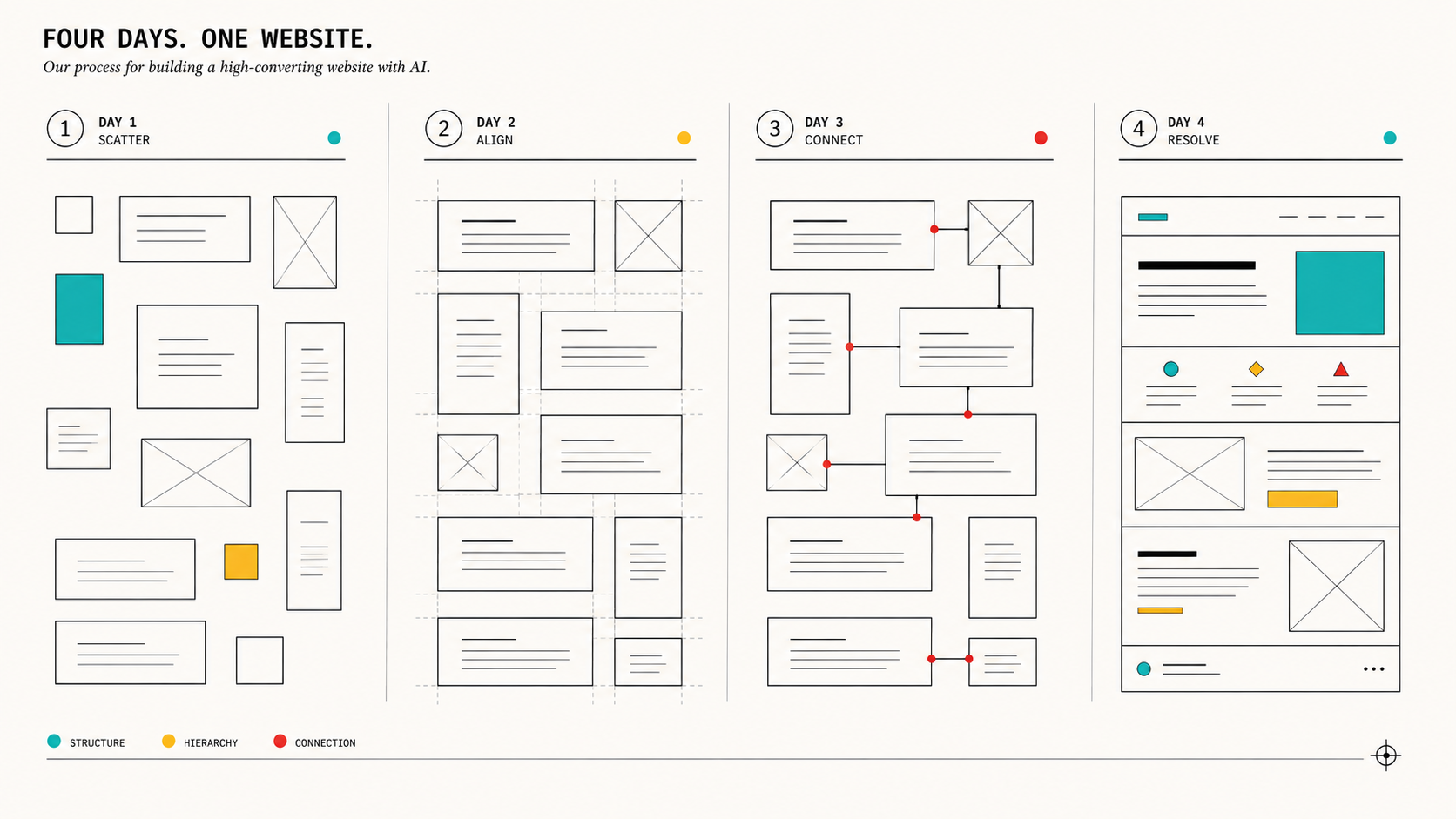
Day 1: Audit, Architecture, and the Redirect Map

Morning. We had Claude Code crawl the existing site structure and cross-reference it against our exported organic keyword data — all 284 ranking keywords, with position, URL, and search volume attached. The goal was a single spreadsheet-equivalent (we kept it as a structured markdown table Claude Code could reference in later sessions) mapping every existing URL to its fate: keep as-is, keep with a new template, merge into a pillar page, or redirect.

This is the step every AI-rebuild article we read glossed over or skipped entirely, and it’s the one that actually protects your SEO equity during a fast rebuild. We were not willing to trade our TAM guide’s position-30 ranking on a 33,100-volume keyword for a prettier page. So the rule was explicit: no URL that currently ranks moves or changes without a mapped, tested redirect, and no ranking page’s core content gets rewritten from scratch — it gets refined in place.

By early afternoon we had:

  • A full URL inventory (roughly 60 indexed pages)
  • A redirect map for the handful of URLs that genuinely needed to consolidate
  • A confirmed “do not touch the URL, refine the content” list for the TAM guide, the ICP meaning post, the inbound-vs-content-marketing post, and the go-to-market plan post — our four strongest existing assets

Afternoon. With the architecture decided, we had Claude Code scaffold the new theme structure inside WordPress: a fresh set of custom block templates, a component library folder, and a local development environment mirroring production so nothing we built touched the live site until Day 4. This is also when we defined the new page types the brain file called for but the old site didn’t have: a proper services architecture reflecting GTM execution (not just “marketing services”), a case study template, and pillar pages for our AI-Integrated Marketing hub.

Day 1 total: roughly 60 pages audited, a redirect map covering every URL change, and a scaffolded theme ready for design work. No design decisions yet — that was intentional. We didn’t want visual polish distracting from the architecture being right first.

Day 2: The Design System and the Pages That Didn’t Exist Yet

Day 2 was almost entirely about building a real design system instead of a page-by-page patchwork, because a design system is what lets you build new page types in hours instead of days for the rest of the project’s life, not just this week.

We gave Claude Code direction on visual tone (the brand color palette, type scale, and a small set of reference screenshots from sites whose density and confidence we liked — not to copy, but to calibrate against) and had it build out:

  • A header/footer/navigation system that could flex for both the core site and the new industrial/medtech sub-section without looking bolted on
  • A modular CTA block system, because our old site had six different visual treatments for “book a call” and none of them matched
  • A pillar-page template built specifically to support long-form content like the TAM guide and the GTM strategy post — with a sticky table of contents, internal cross-linking slots, and FAQ schema built in from the template level, not added post hoc
  • A case study template, which we didn’t have at all before this rebuild — a gap that mattered given our positioning is proof-of-execution, not just claims of it
  • The Industrial & MedTech AI-Integrated Marketing hub template — distinct enough to speak to a manufacturing buyer’s actual concerns (lead generation, engineers in the buying committee, long sales cycles) without feeling like a separate microsite

This is the day the human-in-the-loop model mattered most. Claude Code’s first pass at the hero section for the homepage was clean, fast, and completely generic — competent SaaS-template energy, the same three-line headline plus subhead plus button pattern you’d find on five hundred other B2B sites. We rejected it twice and rewrote the direction ourselves: shorter headline, no stock-photo hero image, lead with a specific claim instead of a category statement. The third pass, once we’d given it a sharper brief instead of “make it better,” landed. Design taste is still a place where a human has to hold the line — the AI will happily ship “fine” all day if you let it.

By the end of Day 2 we had a working component library and every template the new architecture needed, still on the local dev environment, still untouched by anything live.

Day 3: Content Migration and the Industrial/MedTech Hub

This was the longest day, and the one where the “AI-integrated marketing” claim either held up or didn’t, because it’s where content and code had to work together instead of in sequence.

Content migration. Every one of the “do not touch the URL” pages from Day 1 got a content refresh — not a rewrite, a refresh. The TAM guide got updated data references, sharper internal links to the new ICP and GTM pillar pages, and FAQ schema pulled from the new template. The ICP meaning post got the same treatment, with added coverage of business ICP meaning and ICP sales meaning subtopics that search intent data showed we were leaving on the table. None of these pages lost their existing URL, and we spot-checked every one against its pre-rebuild cached version to confirm the core ranking content was intact, not diluted.

New pages. This is where the industrial/medtech opportunity became real instead of theoretical. We built out:

  • A dedicated Industrial B2B & MedTech AI-Integrated Marketing hub page, directly addressing manufacturers and medtech companies looking for a marketing partner that actually understands AI-integrated execution — not the generic “digital transformation” language most industrial agencies use
  • Supporting pages under that hub for industrial lead generation and AI marketing for manufacturers, tying back to content that was already ranking without a home
  • A GTM strategy pillar page consolidating our go-to-market content, with clear subsections addressing the key elements of a b2b go-to-market plan — a term we were already ranking for at position 61 with zero supporting architecture around it

Systems integration. Forms across every new page were wired back into HubSpot, matching our existing CRM lead-routing so nothing about the backend sales workflow changed even though every front-end template did. Claude Code handled the form markup and the HubSpot embed configuration directly, which meant no separate ticket to a martech admin to get forms live before launch.

By the end of Day 3, every planned page existed, populated, and internally linked. What remained was making sure none of it broke anything on the way out the door.

Day 4: QA, Launch, and Turning Search Console Back On

Morning: redirect and regression testing. We ran every one of the 284 tracked keywords’ URLs through the redirect map to confirm each resolved correctly — no redirect chains, no accidental 404s, no URL that used to rank now pointing at a generic homepage. This is tedious, and it’s exactly the kind of task Claude Code is good at doing exhaustively without getting bored on keyword 200 the way a human QA pass tends to. It wrote its own test script to walk the full URL list and flag anything that didn’t return the expected status code — we didn’t ask for that, it proposed it once it understood the scope of the check, and it caught two redirect targets we’d mistyped in the Day 1 spreadsheet.

Midday: performance and mobile QA. Page weight, Core Web Vitals, and mobile rendering across the new templates. The pillar-page template’s sticky table of contents broke on smaller viewports in the first pass — a real bug, not a taste issue — and got fixed in about twenty minutes once flagged.

Afternoon: the Search Console fix. Somewhere in the middle of pre-launch QA, we finally reconnected Google Search Console — a property that had been sitting disconnected for weeks, which meant our own dashboard had a blank space where “actual organic click data” should have been. There’s no elegant way to say this: the fastest way to fix a broken internal reporting gap turned out to be forcing ourselves into a hard launch deadline. We’re not proud of how long it sat broken. We are glad the rebuild made ignoring it impossible.

Evening: go-live. DNS and caching flushed, redirect map pushed live, new pages published, forms tested end to end with real HubSpot submissions, and a rollback snapshot kept on hand in case anything broke that QA hadn’t caught. Nothing did. Site was live by early evening on Day 4.

Four days, start to finish: architecture and audit on Day 1, design system and new templates on Day 2, content migration and new page builds on Day 3, QA and launch on Day 4. No day was “easy” — Day 3 ran long, Day 4’s redirect testing was more tedious than anyone expected — but none of it required waiting on anyone outside the room.

Unexpected Moments

Where Claude Code did more than we asked

The redirect test script on Day 4 is the clearest example — we asked for a spot-check, it built an exhaustive one and used it to catch its own earlier mistakes. Two other places it went further than the brief:

  • Schema markup we didn’t explicitly request everywhere. Once we asked for FAQ schema on the pillar-page template, Claude Code proposed (and we approved) extending Organization and Article schema consistently across every new page type, not just the ones we’d specified, because it recognized the pattern from the first request and applied it site-wide.
  • Orphaned page detection. During the Day 1 audit, it flagged three old blog posts that had no inbound internal links anywhere on the site — pages that existed, indexed, with real search volume, that nothing pointed to. We hadn’t asked it to look for orphans specifically; it surfaced them as part of building the URL inventory because the pattern was visible in the data.

Where we had to pull rank

The generic hero section on Day 2 is one example. Two others stand out:

  • Over-engineering the CTA block system. Left alone, Claude Code’s first draft of the reusable CTA component supported about a dozen configurable variants — background style, icon position, button count, layout direction. Technically impressive, practically a maintenance problem for a marketing team that needs to drop a CTA into a blog post without opening a settings panel with twelve options. We cut it down to three variants and it complied immediately once we explained the audience wasn’t a developer.
  • A stat that needed fact-checking. In drafting supporting copy for the GTM pillar page, a cited industry statistic didn’t match what we could verify against our own sourced data. We caught it in review, asked for the source, and when it couldn’t produce one that held up, we cut the line rather than keep an unverifiable number on a page with our name on it. This is the same standard we hold client content to, and it’s worth stating plainly: the tool will produce plausible-sounding claims, and a human still has to be the one who decides what’s true enough to publish.

The near-miss

The closest call was on Day 4. One of our highest-value redirects — the old URL for our go-to-market plan content — had been mapped to consolidate into the new GTM pillar page. The redirect worked. What we almost missed was that the old page had picked up a handful of external backlinks over the past year that we hadn’t audited for anchor text context. Had we redirected without checking, those links would have pointed at a page whose framing didn’t quite match the anchor text they’d been built around, which can quietly cost you the SEO value the backlink was providing in the first place. We caught it because the redirect test script’s output included the destination URL next to each source, and something about the pairing looked off on a second read. We adjusted the pillar page’s opening section to better match the context those backlinks expected before finalizing the launch. Small fix, but it’s the kind of thing that only surfaces if a human is actually reading the QA output instead of just checking for a green checkmark.

The Numbers: What Changed

Before / after

The comparison that matters most to us in a transfer is the redirect integrity number. Zero of our 284 ranking keywords lost their page or dropped into a redirect chain during the fastest rebuild we’ve ever run. That’s the number that tells you whether “fast” and “reckless” are the same thing here. They weren’t.

30 days post-launch

  • No ranking drop on the four protected pillar pages (TAM guide, ICP meaning, inbound vs. content marketing, GTM plan) — all four held their pre-launch positions within normal week-to-week variance, confirming the “refine, don’t rewrite” rule did its job.
  • New Industrial & MedTech hub page indexed within days and began pulling early impressions on industrial lead generation and ai marketing for manufacturers terms — too early to call a ranking win, but the page now exists to catch the traffic that was previously landing on orphaned blog content with no next step.
  • Time-to-publish for a new landing page dropped from “plan and wait” to same-day, which is the operational change that actually matters long after this rebuild is old news — our marketing team can now ship a new page type without a developer in the loop, because the design system Claude Code built is something our own content team can extend inside WordPress using the existing block templates.
  • Case study template usage: three client case studies published in the 30 days since launch, versus zero in the prior quarter, simply because a template now exists and publishing one doesn’t require custom design work each time.

We’re not going to pretend a 4-day rebuild produced a hockey-stick traffic chart in 30 days — that’s not how organic works, and anyone claiming otherwise in a case study like this is selling you something (which is fine, but, you know). What changed measurably and immediately is publishing velocity, SEO equity retention, and having an actual front door for a market we were already earning traffic from.

The 4-Day Framework You Can Steal

If you’re a marketing leader weighing whether this is a real option for your own site — here’s the framework, mapped explicitly to GTM discipline rather than dev-team logistics, because that’s the lens that determines whether it works.

Day 1 — Lock the narrative before you touch a template.

  • Write the brain file first: ICP, positioning wedge, voice rules, non-negotiables. If you can’t write this in a page, you’re not ready to rebuild — you’re ready to workshop. (We run this workshop)
  • Audit every existing ranking URL and its position/volume. Nothing gets touched without a documented reason.
  • Build the redirect map before the design system exists. Architecture decisions should follow the narrative and the SEO equity you’re protecting, not the other way around.

Day 2 — Design system reflects the narrative, not a template library.

  • Build components, not pages — CTA blocks, headers, pillar templates, case study templates, whatever your new architecture calls for.
  • Expect the AI’s first pass to default to generic. Reject it explicitly and give sharper direction rather than vague “make it better” feedback.
  • Resist over-engineering. If a non-technical person on your team can’t use the component without a settings manual, simplify it before it ships.

Day 3 — Migrate protectively, build expansively.

  • Refresh, don’t rewrite, anything that currently ranks. Preserve the URL, sharpen the content, add internal links to new pages.
  • Build the new pages your keyword and ICP data says you’re missing — the gap between what you rank for and what you have a page for is usually sitting in your own analytics already.
  • Wire systems (CRM, forms, tracking) as you build, not as a separate step afterward.

Day 4 — Launch is a GTM event, not a deploy.

  • Test redirects exhaustively — every tracked keyword’s URL, not a sample.
  • QA against business goals, not just visual bugs: does every page have a next step, does every form route correctly, is analytics actually connected before go-live (not after).
  • Keep a rollback plan on hand and use the launch deadline to fix the internal reporting gaps you’ve been ignoring — you’ll finally have a reason to.

Steal this framework directly. The specific tool matters less than the discipline: narrative before architecture, protection before expansion, and treating launch day as a business event with a checklist, not a code deploy with a party.

Should You Do This Yourself? Answering the Objections

“Isn’t this risky without a development team?” We had development judgment in the room the entire time — ours. Claude Code didn’t replace the need for someone who understands code, redirects, and SEO risk. It replaced the waiting: the ticket queue, the sprint planning, the calendar coordination across a dev agency’s other clients. If you don’t have anyone on your team who can read a redirect map and catch a broken template, that gap doesn’t disappear because the tool is capable — you still need a human who can tell good output from confident-sounding bad output.

“What about code quality and long-term maintainability?” This is a fair concern with any fast build, AI-assisted or not. Our answer was structural: we built inside WordPress specifically so our non-technical marketing team can maintain and extend the site without touching the underlying template code, and we kept the component system deliberately simple (three CTA variants, not twelve) so future changes don’t require re-learning a complex system. Speed at launch doesn’t help you if the thing you shipped can only be touched by the same tool that built it.

“Won’t you lose search rankings moving that fast?” Only if you skip the audit step to save time, which is the one place we refused to move fast. The redirect map and protected-URL list took longer than any other single task on Day 1, and it’s the reason we launched with zero ranking pages lost. Speed on execution and rigor on protection aren’t in tension — the rigor is what makes the speed safe.

“Isn’t four days just a marketing claim?” It’s a real clock, but it’s a clock that only closes because the narrative work — the brain file, the ICP clarity, the positioning decisions — happened before Day 1 started, not during it. If you walk into this without your GTM story already sharp, you’ll spend your four days figuring out who you are instead of building the site that says it. The build was fast because the thinking wasn’t rushed.

What This Means If You Run B2B Marketing

The honest takeaway isn’t “AI can build your website in four days,” even though that’s technically what happened here. It’s that the constraint most B2B marketing teams treat as fixed — website changes are slow, expensive, and gated by a dev team’s calendar — isn’t actually fixed anymore, if you’re willing to put the same GTM discipline into your own site that you’d put into a client’s. AI-integrated marketing, done properly, isn’t a content-generation shortcut. It’s a way to close the gap between what your positioning claims and what a stranger finds when they search for you, on a timeline that matches how fast your market actually moves.

We rebuilt our site in four days because our own positioning demanded we prove speed was real, not aspirational. If you’re weighing whether your site says the same thing your sales team says on a call — and whether you could close that gap in days instead of a quarter — that’s a conversation we’re set up to have, because we just had it about ourselves first.